Discover expert guides, technology trends, and market analysis on smart wearables, audio devices, and GaN fast chargers.
In-depth reviews, features breakdown, and buying considerations for fitness and touchscreen smartwatches.
Explore the latest advances in wireless Bluetooth 5.3 headphones, earphone technology, and personal audio.
Choosing the right Dual Port Car Charger Adapter is more than comparing the largest wattage on a product page. A reliable adapter should match your vehicle’s outlet, your devices, and your daily charging habits. It should also deliver stable power without becoming uncomfortably hot beside the dashboard. Small details matter.
A practical evaluation begins with output ratings, port types, charging protocols, cable quality, and protection features. USB-C Power Delivery can charge newer phones quickly, while USB-A remains useful for older accessories. However, advertised speed may change when two devices share power. That detail is easy to miss. Check whether the adapter lists separate port output and total output clearly.
Fit matters too. A loose plug can disconnect when the car moves over a rough road. A bright indicator can help at night, but excessive light may distract the driver. Look for overcurrent, overvoltage, short-circuit, and temperature protection. Recognized testing marks and a clear warranty can strengthen confidence, although they should not replace careful product research.
Real-world use may reveal weaknesses that specifications hide. Try the adapter with your actual phone, cable, and vehicle before relying on it during a long trip. No checklist is flawless. A charger that works perfectly in one car may sit poorly in another. These seven selection tips will help you compare performance, safety, convenience, and long-term value with a more informed eye.
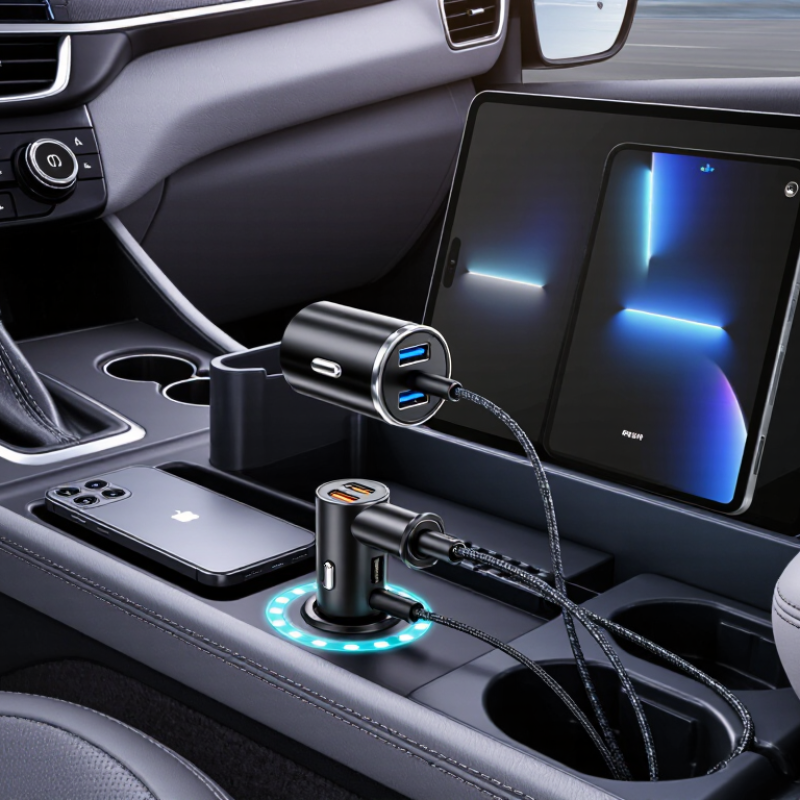
A dual-port car charger is useful only when its standards match your devices. Check whether each port supports USB Power Delivery or another compatible fast-charging protocol. The USB Implementers Forum’s Power Delivery Specification Revision 3.1 allows negotiated power up to 240 watts, but most car adapters provide much less. Do not trust a “fast” label alone. Read the voltage and current values.
Calculate total output, not just the largest number on one port. A charger marked 40 watts may provide 30 watts through one port and only 10 watts when both ports operate. Look for separate output figures. Check the vehicle socket’s limit, too. Many sockets support around 120 watts, but the car manual remains the reliable reference. Leave some headroom. Constantly running at the maximum may increase heat.
Choose a unit with overcurrent, overvoltage, and thermal protection. Inspect the cable rating, because a high-output port needs a suitable cable. USB-IF specifications distinguish standard 3-amp cables from electronically marked 5-amp cables. I once assumed two identical ports would share power evenly. They did not. Test both ports with your actual phone, navigation device, or tablet. Check the charger after twenty minutes; a warm housing is common, but an unusually hot one deserves reconsideration. The numbers looked excellent. Real use was less perfect.
Choosing a dual port car charger starts with the ports, not the advertised wattage. USB-C usually supports newer charging standards, while USB-A remains useful for older cables. Check your devices and cables together. A mismatched port can reduce speed or prevent charging. I once bought an adapter with impressive output, but my older cable limited performance.
Tip 1: Confirm compatibility before purchase. Check whether your phone, tablet, navigation unit, and cables support USB Power Delivery or another charging protocol. Some devices accept only basic charging. That matters.
Tip 2: Compare total output and shared output. A charger may advertise high wattage, but both ports often divide power when used together. Look for separate port ratings.
Tip 3: Avoid judging speed by wattage alone. Heat, cable quality, battery condition, and device limits also affect charging time.
A practical test is simple. Connect two devices during a normal drive and monitor their charging progress. If one device repeatedly disconnects, the adapter may have unstable power delivery. Choose models with overcurrent, overvoltage, and temperature protection. These features improve reliability, although they cannot fix damaged cables.
Tip 4: Check the adapter’s fit in your vehicle’s socket. It should sit firmly without blocking nearby controls.
Tip 5: Read technical specifications carefully, because vague phrases like “fast charge” reveal very little. My own mistake was trusting a short product description. Clear ratings are more useful.
A dual port car charger should protect both your devices and your vehicle’s electrical system. Look for overcurrent, overvoltage, short-circuit, and over-temperature protection. These features can reduce risks when charging two devices at once. A charger with a visible safety certification mark offers another useful quality signal, although markings alone do not prove perfect performance.
Check how the adapter distributes power between its ports. Some models reduce charging speed when both ports are occupied. That behavior is normal, but clear specifications make the product more reliable. The casing should feel firm, fit securely in the socket, and avoid excessive heat during ordinary use. Leave room for airflow. A tightly covered adapter may become warmer than expected.
I once focused mainly on charging speed. That was a narrow view. Heat, cable condition, and socket stability matter just as much. Test the adapter during a short drive before trusting it on a long trip. Stop using it if you notice a burning smell, flickering connection, or unusual warmth. Read the instructions, especially the supported input range and maximum combined output. Protection circuits are helpful, but they cannot correct every damaged cable or faulty vehicle socket. That point is easy to overlook. Reliable charging comes from the adapter, the cable, and careful daily use.
| No. | Selection Tip | What to Check | Practical Benchmark | Why It Matters |
|---|---|---|---|---|
| 1 | Verify the Total Output | Review the combined wattage and the output available from each port when both ports are in use. | For standard USB charging, look for a clearly stated total output of about 20–40 W. Higher-power models should state how power is divided between ports. | A high rating on only one port may not provide fast charging when two devices are connected. |
| 2 | Check Built-In Protection | Look for over-current, over-voltage, over-temperature, short-circuit, and surge protection. | The product documentation should identify the specific protection functions rather than using only a general “safe charging” statement. | These safeguards help reduce the risk of damage caused by abnormal current, voltage, heat, or wiring faults. |
| 3 | Confirm Vehicle Compatibility | Check the supported input-voltage range and whether the adapter fits the vehicle’s 12 V accessory socket. | Most passenger vehicles use a nominal 12 V system, while the alternator can raise the charging voltage above 12 V. Choose an adapter with a stated automotive input range, commonly around 12–24 V. | A compatible input range helps the adapter operate correctly in cars, vans, and some other vehicles. |
| 4 | Choose the Right Port Types | Compare USB-A and USB-C ports with the connectors used by the devices and cables in the vehicle. | A USB-C port is useful for newer devices, while USB-A remains common for existing cables and accessories. Select a two-port combination that matches actual use. | The correct port configuration avoids extra adapters and improves everyday convenience. |
| 5 | Evaluate Charging Standards | Check whether the charger supports a charging protocol compatible with the intended devices. | For USB-C fast charging, look for clearly listed protocol support and the required voltage and current profiles. Do not assume that every USB-C port provides the same charging speed. | Protocol compatibility can affect charging speed, efficiency, and device recognition. |
| 6 | Inspect Design and Heat Management | Consider the fit in the socket, ventilation, housing quality, indicator brightness, and ease of removal. | The adapter should fit firmly without excessive looseness, leave nearby controls accessible, and avoid blocking ventilation openings. | A secure, well-ventilated design can reduce movement, connection interruptions, and heat buildup. |
| 7 | Review Testing and Support Information | Look for clear electrical specifications, safety testing information, instructions, and a reasonable return or support policy. | Prefer documentation that lists input range, port output, protection functions, operating conditions, and applicable regulatory or safety testing details. | Transparent specifications make it easier to compare products and identify whether the stated performance is suitable for the vehicle and devices. |
Safety note: Use the adapter only with a properly maintained vehicle socket and compatible cables. Stop using it if it becomes unusually hot, smells burnt, sparks, or shows visible damage.
7 Tips for Choosing a Dual Port Car Charger Adapter
Assess Size, Installation, and Everyday Convenience
Measure the socket area before buying a dual port car charger adapter. A bulky body can block dashboard controls, cup holders, or nearby storage. Slim designs usually fit better in crowded consoles. Check the adapter’s depth, not only its width. A short cable also reduces tangles around the gear selector.
Inspect the installation carefully. The plug should sit firmly without wobbling on uneven roads. Look for clear power ratings, overcurrent protection, temperature control, and certification details. The International Energy Agency’s Global EV Outlook 2024 reported more than four million public charging points worldwide in 2023. That growth highlights a practical issue: vehicles increasingly carry more charging equipment, but sockets still vary widely. Confirm your vehicle’s outlet capacity before using two ports together.
Everyday convenience matters more than impressive packaging. Choose ports that match your devices, such as USB-C for newer phones and tablets. The U.S. Department of Energy’s Alternative Fuels Data Center recorded over 192,000 public charging ports in the United States during 2024. More charging access is useful, but short trips still depend on reliable in-car power. Test both ports with your actual cables. I once focused too much on output speed and ignored heat around the socket. That was a mistake. Leave enough clearance for your hand, especially at night. Small details count.
Assess size, installation, charging capacity, and everyday convenience before buying.
The chart shows practical minimum combined output recommendations for common two-device charging scenarios. Actual requirements vary by device and cable.
Compare Materials, Reliability, and User Value
A dependable dual port car charger begins with its outer shell. Choose heat-resistant plastic or aluminum with clean seams and firm port openings. I once used a lightweight adapter that rattled on rough roads. It worked, but the loose fit reduced my confidence.
Check the contact pins and internal construction. Strong pins should connect smoothly without excessive force. Review the rated output for both ports, especially when two phones charge together. Some adapters advertise impressive total power, yet each port slows noticeably under load. That detail matters more than a large number on the package.
Look for overcurrent, overheat, and short-circuit protection. Independent safety testing adds useful evidence, although certification labels still deserve verification. A good charger should remain stable during long drives. Feel the housing after thirty minutes, but avoid touching exposed metal parts.
Consider compatibility with your vehicle’s socket. It should sit firmly without blocking nearby controls. Read recent user reviews for heat, noise, fit, and charging consistency. Ignore reviews that only praise appearance. Compare the warranty, return policy, and realistic service life against the price. Cheap is not always valuable. Expensive is not automatically reliable. I sometimes overvalue fast charging and overlook daily convenience. A slightly slower adapter with better cooling may serve a family better. User value comes from safe performance, durable materials, and predictable charging over time. Small details count.
USB-C suits newer phones and tablets. USB-A remains useful for older cables. Match both ports to your devices.
Devices may support different charging standards. Check the phone, tablet, navigation unit, and cable together. A mismatched port can slow charging.
No. Device limits, cable quality, battery condition, and heat also affect speed. Wattage alone can mislead.
Power may be shared between them. Check separate port ratings and total output. The printed maximum may apply to one port only.
Connect two devices during a normal trip. Watch whether both gain battery power. Repeated disconnections suggest unstable power delivery.
Choose overcurrent, overvoltage, and temperature protection. These features improve reliability. They cannot repair damaged cables.
Measure the socket area and adapter depth. A bulky body may block controls or cup holders. The plug should stay firm on uneven roads.
Leave hand clearance around the socket, especially at night. A short cable reduces tangles near the gear selector. I once ignored heat around the socket. That was a mistake.
Choosing the right Dual Port Car Charger Adapter starts with understanding charging standards and total power output. Make sure the adapter can support the combined power needs of your devices, especially when charging two phones or other accessories at the same time. Check the port types carefully, such as USB-A or USB-C, and confirm compatibility with your cables and devices. Faster charging is useful, but only when your devices support the required charging technology.
Safety should also be a priority. Look for built-in protection against overheating, overcurrent, overvoltage, and short circuits. A compact design that fits securely in your vehicle’s power socket can improve everyday convenience, while easy installation makes the adapter more practical for regular use. Finally, compare the materials, construction quality, reliability, and overall value. A well-made adapter with a thoughtful design can provide dependable performance and make in-car charging simpler and safer over time.